Posts filed under 'IT News'
UK Internet service provider Demon Internet has had a peculiar self-induced security breach.
Demon Internet has sent out a spreadsheet containing the personal details of thousands of customers with one of its new ebills.
[..]
The Excel spreadsheet – which isn’t password protected – contains more than 3,600 records. It includes the full name of the customers, email addresses, telephone numbers and names of the customers’ businesses. Police forces, NHS trusts and government officials are among the email addresses listed in the database.
The file also includes two unidentified fields which adopt the same format as the username and password for the ebilling system that was sent to the PC Pro reader.
[..]
Demon Internet is blaming “human error” for the security breach.
Apparently they have since changed the passwords of affected customers…I doubt that they’ll offer to change the phone numbers of people with silent numbers though.
The mind boggles as to what all of this information was doing in a spreadsheet to begin with.
Samuel
September 24th, 2009 at 10:13pm
Facebook is starting to drive me nuts. Every six hours something else breaks, whether it be the inbox claiming to have an unread message everywhere except for the inbox page, comments appearing and disappearing at random, mysterious event notifications that just don’t quite seem to be on my plane of existence yet, or the far-too-common “sorry, can’t post what you just wrote, try again later” messages.
Facebook is having problems and they have been going on for a while now…and it’s not just me, I have confirmation of these problems from friends in various corners of the (not round if it has corners) globe. It would be nice of Facebook could provide some sort of explanation…even if it was just “we know, we’re working on it”.
Samuel
September 22nd, 2009 at 06:08pm
You may be surprised by the amount of data about you, is made available to the applications installed by your friends. This video explains, and also shows how to limit the availability of such information, albeit with the loss of some functionality.
Paul Fenwick, creator of the video, has more information on his blog, and bizarrely enough, in a Facebook group.
Samuel
September 17th, 2009 at 04:33pm
Google are very pleased with themselves at the moment as they recently purchased reCAPTCHA, one of the many organisations behind those squiggly sets of letter and number which attempt to make you prove that you are human and not an evil spamming robot.
CAPTCHAs, in order to work as intended, rely on the fact that computers have a hard time reading the squiggly text, but Google and reCAPTURE seem to want to make it easier for computers to recognise the squiggly text.
Since computers have trouble reading squiggly words like these, CAPTCHAs are designed to allow humans in but prevent malicious programs from scalping tickets or obtain millions of email accounts for spamming. But there’s a twist — the words in many of the CAPTCHAs provided by reCAPTCHA come from scanned archival newspapers and old books. Computers find it hard to recognize these words because the ink and paper have degraded over time, but by typing them in as a CAPTCHA, crowds teach computers to read the scanned text.
In this way, reCAPTCHA’s unique technology improves the process that converts scanned images into plain text, known as Optical Character Recognition (OCR). This technology also powers large scale text scanning projects like Google Books and Google News Archive Search.
In this way, reCAPTCHA’s unique technology also improves computers’ ability to read CAPTCHAs, therefore defeating the whole process…although, it could already be defeated. If the letters are coming from ancient scanned newspapers, and reCAPTCHA is relying on you, the human, to teach it what the letters are, does that not therefore mean that reCAPTCHA has no idea what the letters are in the first place, and will let you in regardless of what input you provide?
Presumably reCAPTCHA is providing a combination of characters that it does and does not know in each capture, requiring you to enter the known characters correctly and hopefully the others correctly as well…but this still defeats the purpose of the CAPTCHA, as by teaching the computer how to read the squiggly text, CAPTCHAs would have to grow in complexity over time in order to stay ahead of the reading ability of computers.
And surely it is just a matter of time, if it hasn’t already happened, until malware starts taking note of what you enter for a given CAPTCHA, so that the bad guys have a CAPTCHA based Optical Character Recognition database of their own.
Samuel
September 17th, 2009 at 12:19pm
I just had a most unusual fault occur during my mobile phone conversation with a friend.
Mid-conversation, the call cut out, which isn’t all that unusual on its own, however at my end I received the Telstra disconnected signal (the one similar to the engaged signal, but with one tone quieter than the other), followed by the Telstra ringing signal, and then one side of another person’s phone call in which they continued to converse with the other party to their call, but seemed oblivious to my “hello? are you still there?”. It seemed that this mystery person was informing the other party to their call that somebody would be leaving at 6pm.
After about fifteen seconds of hearing one side of their call, the connection dropped completely, with my phone registering the end of the call.
Apparently, the person at the other end of my call did not hear any of this…I suspect that my phone registered the termination of the the call after the other party to my call hung up after hearing nothing for a little while.
Samuel
September 3rd, 2009 at 06:00pm
It looks like Yahoo doesn’t like criticism of Barack Obama. Their Flickr photo gallery service has seen fit to silence opposition to the anointed one.
 That Obama Socialism graphic that’s been doing the rounds of late has caused a bit of a stir on Flickr where they have deleted it, citing a copyright issue.
After creating the image [Firas] Alkhateeb posted it to his Flickr account and ended up getting over 20,000 views on it. 20,000 views that is until Flickr pulled the image down censoring him, along with everyone who commented on the image, citing “copyright-infringement concerns,” according to the [Los Angeles] Times.
Personally I think it’s too bad that Flickr decided to censor this iconic image. Whatever you may or may not think about this image and it’s appropriateness, the image would absolutely and unequivocally be considered parody and parody has always been one of the most effective defenses against any copyright complaint. Parody is why Weird Al gets away with creating a song called “Eat It,” directly to the tune of Michael Jackson’s “Beat It.”
What’s more, in the interest of free speech, political parody *especially* is perhaps given the widest berth of all. This is why Ralph Nader was able to directly rip MasterCard’s “Priceless” campaign and why the courts subsequently ruled in his favor after MasterCard sued him over it. Earlier today, a friend and Flickr contact of mine from DMU, A Boy and His Prime, who is a law student, put it more directly. “If you produce something that is transformative, and not derivative, then it’s fair use (Folsom v Marsh). In Campbell v Acuff-Rose, 510 U.S. 569, Souter seemed to suggest that the main idea is substitutability, and that makes a lot of sense when you consider what copyright protects (i.e. your interest in your own work). The Jokerbama does not replace the original photo in any sense.”
And it’s not just this picture. It seems that posting anti-Obama comments can get your Flickr account nuked as well.
Flickr user Shepherd Johnson was browsing the official White House photostream one night when he decided to post a politically-charged comment. Then another, then another. Soon, without warning, Yahoo’s photo-sharing service deleted his account, complete with 1,200 pictures.
[..]
The Virginia man’s initial 10 or so comments, which went up Wednesday night, were deleted without explanation by Friday. That night, Johnson posted roughly ten more to different White House photos, this time linking in another Flickr user’s Abu Ghraib picture, as allowed by Flickr’s comment formatting (see Johnson’s reproduction of his comment, left, taken from his post to freedom-of-information hub Cryptome).
In the midst of this second round of commenting, Johnson found his account was gone. There had been no warning of any sort from Yahoo, he said. Johnson would later work his way up Flickr’s customer service tree, eventually leaving a message for the vice president of customer service and other bigwigs. He even left a message for Yahoo CEO Carol Bartz — a noted fan of frank discourse — on Bartz’s home answering machine.
Johnson, who lives outside Richmond, still has no answers. More crucially, he also doesn’t have access to any of the 1,200 pictures he uploaded to Flickr under his paid “Pro” membership. Many of the pics, he said, were “completely irretrievable — I didn’t back them up on any disks, I just spur-of-the-moment loaded it up and deleted the flash” memory originals.
This is exactly why I refuse to use Flickr or Facebook as my primary photo gallery, as I refuse to give a third party the power to moderate my publications. Flickr, with their politically charged censoring of accounts critical of Barack Obama, have just made my position that bit more solid.
And how do Flickr respond? By clamming up:
In accordance with Flickr’s policy, we cannot disclose information to third parties concerning a member’s account. However, in joining Flickr, all of our members agree to abide by our Community Guidelines. These guidelines require that all of our members be respectful of the community and flag content that may not be suitable for “safe” viewing.
[..]
Flickr is a very large community made up of many types of members from all over the world, and we respect the viewpoints and expressions of all of our members.
Very funny way to show it.
Samuel
August 20th, 2009 at 01:54pm
Yesterday Woolworths announced that they are launching their own pre-paid mobile phone service which will run on the Optus network. Woolworths are touting it as a simple solution with a single price structure and no confusing “cap” deals. On that front, they are right, however when it comes down to the actual cost of it, it’s not quite as cheap as Woolworths might like us to believe when compared to other providers.
The basic deal is:
Cost per 30 seconds: $0.15
Flagfall: $0.15
Cost per text message: $0.15
Coast per MMS: $0.50
Sounds good on the surface of it, but that has more to do with the fact that other providers have made their own deals sound expensive by charging you in credit rather than real money, and converting real money to outlandish amounts of credit.
For example, Vodafone’s advertised pre-paid rates are:
Cost per 30 seconds: $0.88
Flagfall: $0.35
Cost per text message: $0.28
Cost per MMS: $0.50 (video messages cost $0.75)
Optus:
Cost per 30 seconds: $0.78 (charged in 60 second blocks)
Flagfall: $0.35
Cost per text message (to other Optus pre-paid users): $0.25
Cost per text message (to other carriers): $0.29
Cost per MMS (to other Optus pre-paid users): $0.25
Cost per MMS (to other carriers): $0.29
Video MMS does not appear to be supported.
Telstra:
Cost per 30 seconds: $0.39
Flagfall: $0.30
Cost per text message: $0.25
Cost per MMS: $0.50 (video messages cost $0.75)
Virgin Mobile caps:
Cost per 30 seconds: $0.45 (charged in 60 second blocks)
Flagfall: $0.40
Cost per text message: $0.25 (free to other Virgin Mobile users)
Cost per MMS: $0.60
Video MMS does not appear to be supported
Virgin Mobile Bean Counter:
Cost per 30 seconds: $0.10
Flagfall: $0.25
Cost per text message: $0.10
Cost per MMS: $0.60
Video MMS does not appear to be supported
Naturally there are many more providers and options, but this is enough to run some comparisons on for now. The above prices are all in “credit” rather than real money, so to find out the real cost they need to be converted back in to real money. In most cases, the more you recharge with, the more “credit” you get for your money. For the purposes of this comparison , I’m going to calculate the cost of using the services after recharging with $30 and $50. As the Woolworths services is clearly aimed at the lower-budget end of the market, there’s not much point in running comparisons against the more costly options, however I will include links to the plans so that you can run your own comparisons. I’m also rounding all figures to the nearest cent for readability purposes.
Costs in real money:
Woolworths Mobile:
Credit is equal to real money in this service
Cost per 30 seconds: $0.15
Flagfall: $0.15
Link to plan.
Vodafone $29 cap:
$29 of real money equals $150 of credit. Therefore each dollar of real money is equal to $5.17 of credit.
Cost per 30 seconds: $0.17
Flagfall: $0.07
Cost per text message: $0.05
Cost per MMS: $0.10 (video messages cost $0.15)
Link to plan
It’s worth noting that this plan also provides an additional $150 of credit specifically for use when calling other Vodafone customers.
Vodafone $49 cap
$49 of real money equals $350 of credit. Therefore each dollar of real money is equal to $7.15 of credit.
Cost per 30 seconds: $0.12
Flagfall: $0.05
Cost per text message: $0.04
Cost per MMS: $0.07 (video messages cost $0.11)
Link to plan
It’s worth noting that this plan also provides an additional $350 of credit specifically for use when calling other Vodafone customers.
Optus “Bigger and Better Freecalls”
Credit on these plans is equal to real money, however the $30 plan comes with 300 minutes of free calls and 100 further minutes of free calls to five Optus pre-paid numbers which you nominate. The $50 plan has 500 free minutes and 150 further minutes of free calls to your nominated five Optus pre-paid numbers.
There are a gazillion other plans and options, each with their very own list of difficult to compare extras and addons.
Cost per 30 seconds: $0.78 (charged in 60 second blocks)
Flagfall: $0.35
Cost per text message (to other Optus pre-paid users): $0.25
Cost per text message (to other carriers): $0.29
Cost per MMS (to other Optus pre-paid users): $0.25
Cost per MMS (to other carriers): $0.29
Video MMS does not appear to be supported.
Link to plan.
Telstra:
Telstra organise their caps as “packs” which you buy with your credit balance. Credit is equal to real money.
Cost per 30 seconds: $0.39
Flagfall: $0.30
Cost per text message: $0.25
Cost per MMS: $0.50 (video messages cost $0.75)
Link to plan.
$20 text pack: 12 cents per text message
$50 text pack: 10 cents per text message
$20 photo MMS pack: 37 cents per message
$50 photo MMS pack: 34 cents per message
$20 talk pack: 37 cents per 30 seconds (plus flagfall) charged in 60 second blocks
$50 talk pack: 34 cents per 30 seconds (plus flagfall) charged in 60 second blocks
Link to “plus packs”.
Virgin Mobile $35 cap:
$35 of real money equals $180 in credit. Therefore each dollar of real money equals $5.14 of credit.
Cost per 30 seconds: $0.09 (charged in 60 second blocks)
Flagfall: $0.08
Cost per text message: $0.05 (free to other Virgin Mobile users)
Cost per MMS: $0.12
Video MMS does not appear to be supported
Link to plan.
Virgin Mobile $45 cap:
$45 of real money equals $320 in credit. Therefore each dollar of real money equals $7.11 of credit.
Cost per 30 seconds: $0.06 (charged in 60 second blocks)
Flagfall: $0.06
Cost per text message: $0.04 (free to other Virgin Mobile users)
Cost per MMS: $0.08
Video MMS does not appear to be supported
Link to plan.
Virgin Mobile Bean Counter plan:
Money and credit are equal in this plan.
Cost per 30 seconds: $0.10
Flagfall: $0.25
Cost per text message: $0.10
Cost per MMS: $0.60
Video MMS does not appear to be supported
It’s amusing that this plan is advertised as being a cheap plan for people who want the “best deal around”, and yet it actually costs more than the most expensive of the Virgin caps.
Link to plan.
It’s quite clear from all of this that Woolworths are not the cheapest of the lot, however with the complexity of the plans offered and advertised by the rest of the mobile providers (and I haven’t even come close to examining the entire competition), the Woolworths plan does come across as being a simple and cheap option. The competition have their own “credit for cash” deals to blame for this because, as much as “$320 credit for $45” sounds great, the advertised call rates in credit don’t sound great. The fact that it takes excessive use of a calculator to compare the plans also works in Woolworths’ (and Virgin Mobile’s Bean Counter plan’s) favour as most people won’t bother.
Woolworths also have another plan here which they aim to use to gain some extra market share. They are going to stop selling recharge credit for other mobile providers in their stores and “participating fuel outlets”. It’s cunning, but considering that I buy all of my credit via the Internet or phone call using a pre-registered credit card, it’s not a killer blow.
I’ll be interested to see how much market share Woolworths manage to pick up. Their plan simplicity will probably get them a decent chunk (not huge, but decent) and with any luck will have the knock-on effect of forcing other providers to clarify their plans, which would benefit all consumers.
Samuel
August 4th, 2009 at 06:30pm
An interesting story from The Age (which seems to have grabbed it from sister publication The Sydney Morning Herald) which should have every other VOIP provider on the planet salivating.
eBay says it may have to shut down Skype due to a licensing dispute with the founders of the internet telephony service.
The surprise admission puts a cloud over the 40 million active daily users around the world who use Skype for business or to keep in touch with friends and far-flung relatives.
[..]
The online auction powerhouse bought Skype from entrepreneurs Niklas Zennstrom and Janus Friis for $US2.6 billion in 2005, but this did not include a core piece of peer-to-peer communications technology that powers the software.
eBay has since been licensing the technology from the founders’ new company, Joltid, but the pair recently decided to revoke the licensing agreement.
The matter is now the subject of a legal battle in the English High Court of Justice, with eBay trying to force Joltid to let it continue using the technology.
In a quarterly report filed with the US Securities and Exchange Commission, eBay said in no uncertain terms that if it lost the right to use the software it would most likely have to shut Skype down.
[..]
In the filing eBay also said that, even if it was successful in developing alternative software, the technical challenge of assuring backward compatibility with older versions of Skype’s technology ‘‘may be difficult to overcome’’.
The story lacks any better description of what part of the program, precisely, it is that the licence dispute is in relation to…and “a core piece of peer-to-peer communications technology” is so vague that I’m forced to wonder what eBay are hiding. I can’t find any press releases on the subject, so it looks to me as if eBay are trying to keep this as quiet as possible.
The story seems to be based on the following section from page 15 of Skype’s quarterly report (to the end of June 30, 2009) to the United States Securities and Exchange Commission, but even there they seem to be keeping details to an absolute minimum:
Skype licenses peer-to-peer communication technology from Joltid Limited pursuant to a license agreement between the parties. The parties had been discussing a dispute over the license.
In March 2009, Skype Technologies S.A. filed a claim in the English High Court of Justice (No. HC09C00756) against Joltid Limited. Following the filing of the claim, Joltid purported to terminate the license agreement between the parties. In particular, Joltid has alleged that Skype should not possess, use or modify certain software source code and that, by doing so, and by disclosing such code in certain U.S. patent cases pursuant to orders from U.S. courts, Skype has breached the license agreement.
Joltid has brought a counterclaim alleging that Skype has repudiated the license agreement, infringed Joltid’s copyright and misused confidential information. On the basis of, among other things, the parties’ mutual dealings since the execution of the license agreement, Skype asked the English High Court for declaratory relief, including findings that Skype is not in breach of the license agreement, that Joltid’s notice of breach and subsequent notice of termination are invalid, and that Joltid has certain indemnity obligations in relation to the U.S. patent proceedings.
Trial is currently scheduled for June 2010. Although Skype is confident of its legal position, as with any litigation, there is the possibility of an adverse result if the matter is not resolved through negotiation. Skype has begun to develop alternative software to that licensed through Joltid. However, such software development may not be successful, may result in loss of functionality or customers even if successful, and will in any event be expensive.
If Skype was to lose the right to use the Joltid software as the result of the litigation, and if alternative software was not available, Skype would be severely and adversely affected and the continued operation of Skype’s business as currently conducted would likely not be possible.
(line breaks added for readability purposes)
eBay have known about this issue since March, and we are only hearing about it now. It really makes me wonder just how serious this issue is. eBay have the ability to disable the entire service simply by shutting down the login servers, so shutting down the service isn’t a hollow threat…clearly the risk of that is high enough for them to not want to make much noise about it.
Watch this space.
Samuel
August 1st, 2009 at 03:12am
Scarily enough, Google knows where I live…well almost. It’s placed me in an intersection which borders the block on which I live. Apparently it worked this out based by gathering “information about nearby wireless access points and your computer’s IP address”.
Ah well, at least I know that if ASIO ever want to make me disappear and forget to check the electoral roll, they can ask Google where I live and only need to knock down the doors of a dozen or so houses before they find me.
Samuel
July 29th, 2009 at 04:06pm
My laptop has a chronically slow system clock, so it is forever showing the wrong time, and with my obsessive compulsive requirement of all of my clocks to be correct to the second, this is a very annoying trait. Windows can automatically synchronise the system clock with an internet time server on a weekly basis, but this isn’t much help for me as by the time a week goes by, my computer clock is 56 seconds behind (it loses a second every three hours). It also doesn’t help that the default time server “time.windows.com” is notorious for often not responding to requests.
It’s a simple enough job to change the timeserver which your computer uses (right click on the clock in the system tray, choose “adjust date/time”, click the “Internet Time” tab, if necessary click on the “change settings” button, and choose a different timesever from the list”) however there is no option to change the frequency of these updates. Thankfully though, it is possible, and merely requires a simple registry edit.
Click the start button or the Windows icon, depending on your version of Windows.
(Versions prior to Vista: click run)
Type “regedit” (vista: click the “regedit” icon) (earlier versions: click “OK”)
Navigate to HKEY_LOCAL_MACHINE\SYSTEM\CurrentControlSet\Services\W32Time\TimeProviders\NtpClient
Double click on “SpecialPollInterval”
The figure is the number of seconds between updates. By default it is 604800 (one week). I set mine to 43200 (twelve hours).
Click OK.
After the next scheduled time update (or manually forced update), the newly selected update schedule will kick in.
A word of warning though. Some timeservers will block you if you update your time too regularly. Setting your update schedule to a very low number is not recommended.
Samuel
July 29th, 2009 at 01:17am
I haven’t seen them do this before. YouTube is currently completely down for maintenance. YouTube pages are all redirecting to a “down for maintenance” page, and embedded videos are failing to display.
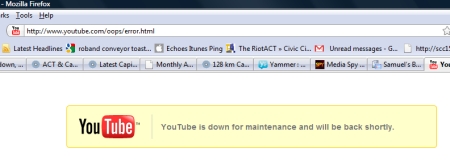
One hopes that this doesn’t last for too long.
Update 9:44pm: Still partially down according to the YouTube people…but I can’t work out what isn’t back online! End Update
Samuel
July 12th, 2009 at 09:35pm
Google have finally done what people have been expecting for years…they’re launching an Operating System to compete with Windows, Mac, Linux and others, although after looking at the details, I don’t expect it to compete, except for a very niche market.
It’s been an exciting nine months since we launched the Google Chrome browser. Already, over 30 million people use it regularly. We designed Google Chrome for people who live on the web — searching for information, checking email, catching up on the news, shopping or just staying in touch with friends. However, the operating systems that browsers run on were designed in an era where there was no web. So today, we’re announcing a new project that’s a natural extension of Google Chrome — the Google Chrome Operating System. It’s our attempt to re-think what operating systems should be.
Google Chrome OS is an open source, lightweight operating system that will initially be targeted at netbooks. Later this year we will open-source its code, and netbooks running Google Chrome OS will be available for consumers in the second half of 2010.
Spiel sounds good apart from some odd factual errors (“the operating systems that browsers run on were designed in an era where there was no web” for starters), but here’s where it becomes incredibly niche. Unless you can find a web application to fulfil your needs, Chrome OS just isn’t for you.
Speed, simplicity and security are the key aspects of Google Chrome OS. We’re designing the OS to be fast and lightweight, to start up and get you onto the web in a few seconds. The user interface is minimal to stay out of your way, and most of the user experience takes place on the web.
[..]
The software architecture is simple — Google Chrome running within a new windowing system on top of a Linux kernel. For application developers, the web is the platform. All web-based applications will automatically work and new applications can be written using your favorite web technologies. And of course, these apps will run not only on Google Chrome OS, but on any standards-based browser on Windows, Mac and Linux thereby giving developers the largest user base of any platform.
So, no MS Office (which means no Outlook) which probably makes it unusable for the vast majority of business users. No Cool Edit or Audacity for the audio enthusiasts amongst us. No video editing software (but YouTube, being a “web application” will work…editing stuff to upload to YouTube won’t be so easy), no “insert name or type of non-web-application which you use everyday”.
Effectively, as Google said, it is “for people who live on the web”. If you do anything outside the web on your computer, it’s not for you.
The business model for Google is obvious. Move everything (or as close to everything as possible) on to the web, making more websites and applications which can carry Google ads. Actually getting web applications to a point where this will be feasible is going to be the problem for a couple reasons:
1. Google Docs: It has some useful features, but most businesses can’t replace MS Office with it because MS Office has so many more features and functions, that’s it’s just not funny to compare the two.
2. Security: If you think the Department of Defence are going to trust all of their secret data to a web-application, even if it’s one that they host themselves, you’ve got to be kidding.
For the moment at least, Chrome OS seems to be targeting the “I need Internet access everywhere, and either don’t want to use a phone to do so, or need slightly more functionality than I can get out of a phone” market…and frankly, it’s not a big market.
This needs to be spruced up a bit. Until then, it’s just another interesting experiment with an awful lot of money at-the-ready to keep it going.
Samuel
July 9th, 2009 at 12:55pm
I received an email this morning from the folks at McAfee anti-virus with the subject line “Your Dell PC Protection Expired 14/09/2008”. Looking back through my emails I can see that they did warn me about the impending expiry on the 7th of September last year, but this is their first “warning warning warning: your anti-virus subscription has expired” emails.
It’s good to see that those courier pigeons are as quick as ever.
I should point out that one of the first things I did after purchasing my laptop in June 2007 was remove McAfee from it. I am quite happily using Kaspersky anti-virus, which I believe to be a far superior product.
Samuel
May 19th, 2009 at 05:08pm
The weather bureau’s Canberra temperature page has gone on holidays. It’s currently stuck on the 5:45am temperatures, and it looks like it’s the entire Canberra weather data feed because Weatherzone have the same problem.
This makes me wonder what radio stations are doing for current temperatures.
I use the Gungahlin Weather Centre for Gungahlin temperatures as a matter of course, but I have had to fall back on ActewAGL for City temperatures (which may be slightly out considering that it’s on top of a concrete building) and Weather Underground’s Conder temperatures for the Tuggeranong weather.
It looks like the bureau’s entire automated system has gone bang, as Sydney is also stuck in a time warp. Oops!
A day when things don’t break is not a day at all.
Update 7:50am: And the Bureau are back at work. End Update
Samuel
May 12th, 2009 at 07:23am
I note that Yahoo are shutting down Geocities, their free and ad-ridden website hosting and creating service.
As well as a large amount of pure garbage, there is some useful stuff buried amongst the miriad of sites on Geocities, so I hope that Yahoo or somebody else is archiving it somewhere. Yahoo aren’t saying that they will retain any form of archive, and it would be a pity to see some of that data get deleted, but I can understand their decision…I’m sure that they don’t make much money on it, in fact I wouldn’t be in the least bit surprised if they make a loss on it.
The end of Geocities has reminded me that I have one page on there from a few years back (2005 to be precise) and another related handful of pages on another free hosting service. I’ve been meaning to archive them on this site for a while…I suppose there’s no time like the present.
Samuel
April 25th, 2009 at 07:46am
Next Posts
Previous Posts
